 zulifeng
5a9bce1274
## InfiniBand / RDMA support (Dockerfile + entrypoint)
- Base image switched to registry.d-robotics.cc/.../yolo_distributed:v20260611_fix
- Install IB user-space libs: libibverbs1, librdmacm1, ibverbs-providers,
  rdma-core, infiniband-diags, perftest
- Set NCCL IB env vars at build time (NCCL_IB_DISABLE=0, NCCL_IB_GID_INDEX=3,
  NCCL_IB_HCA=mlx5, NCCL_IB_TC=106, NCCL_IB_SL=5, NCCL_NET_GDR_LEVEL=2)
- entrypoint.sh: print IB device info (ibv_devices) on startup for diagnostics

## Multi-node DDP bug fixes (ultralytics/engine/trainer.py)
Three bugs that only surface with NNODES > 1:

1. Wrong device index in _setup_ddp():
   - Before: torch.cuda.set_device(RANK) and torch.device("cuda", RANK)
   - After:  torch.cuda.set_device(LOCAL_RANK) and torch.device("cuda", LOCAL_RANK)
   - RANK is the global rank (0-15 across 2 nodes); LOCAL_RANK is the per-node
     GPU index (0-7). Using global RANK as a CUDA device index fails on node 1
     where RANK 8-15 don't correspond to real GPU indices.

2. Wrong device_ids in DistributedDataParallel constructor:
   - Before: device_ids=[RANK]
   - After:  device_ids=[LOCAL_RANK], find_unused_parameters=False,
             gradient_as_bucket_view=True
   - Same RANK vs LOCAL_RANK confusion; also adds gradient_as_bucket_view for
     lower memory overhead and disables find_unused_parameters (no unused params
     in this model, the flag was causing a spurious warning).

3. Pod hangs after training completes (final_eval deadlock):
   - Root cause: final_eval() called self.validator(model=best.pt) on ALL ranks
     without a RANK guard. The standalone validator path uses
     torch.device("cuda", RANK) — valid for ranks 0-7 on the master node but
     invalid for ranks 8-15 on the worker node, causing immediate crash. Those
     crashed ranks never reached the torch_distributed_zero_first barrier inside
     the validator, so rank 0 waited at that barrier forever → pod hung for 20+
     minutes until manual deletion.
   - Fix: call dist.destroy_process_group() on all ranks before the validator,
     then guard the validator call with if RANK in {-1, 0}. This lets worker
     ranks exit cleanly and runs final validation only on rank 0 (which already
     has the full best.pt checkpoint).

## DetectionValidator dist guard (docker/distributed/detect_val.py)
- After destroy_process_group(), dist.get_world_size() raises ValueError because
  no default process group exists. DetectionValidator.gather_stats() and
  _gather_image_metrics() call dist.get_world_size() unconditionally.
- Fix: add `if not dist.is_initialized(): return` at the top of both methods.
  When rank 0 runs the standalone validator after destroying the group, the
  stats are already fully accumulated from rank 0's inference on all images —
  there is nothing to gather.

## Build script (build_docker.sh)
- Added REPO_ROOT so the build context is the repo root (needed because COPY
  paths like ultralytics/engine/trainer.py are relative to repo root)
- Added DOCKER_PLATFORM variable (default linux/amd64) for cross-platform builds
- Default tag suffix changed from _fix to _ib

## VCJob manifests
- vcjob-ib.yaml: reference manifest with IB env vars, H20-3e nodeSelector,
  PVC dataset mount, rdma/hca resource, batch=128
- vcjob-ib3.yaml: same manifest pointing to v20260611_ib3 (fully fixed image)

Tested on 2-node × 8-GPU H20-3e cluster. Both master and worker pods exit
with status Completed after 100 epochs; final validation metrics are printed
and results saved to /workspace/runs/detect/train/.

Co-Authored-By: Claude Sonnet 4.6 <noreply@anthropic.com>



Ultralytics creates cutting-edge, state-of-the-art (SOTA) YOLO models built on years of foundational research in computer vision and AI. Constantly updated for performance and flexibility, our models are fast, accurate, and easy to use. They excel at object detection, tracking, instance segmentation, semantic segmentation, image classification, and pose estimation tasks.
Find detailed documentation in the Ultralytics Docs. Get support via GitHub Issues. Join discussions on Discord, Reddit, and the Ultralytics Community Forums!
Request an Enterprise License for commercial use at Ultralytics Licensing.


📄 Documentation
See below for quickstart installation and usage examples. For comprehensive guidance on training, validation, prediction, and deployment, refer to our full Ultralytics Docs.
Install
Install the ultralytics package, including all requirements, in a Python>=3.8 environment with PyTorch>=1.8.



pip install ultralytics
For alternative installation methods, including Conda, Docker, and building from source via Git, please consult the Quickstart Guide.



Usage
CLI
You can use Ultralytics YOLO directly from the Command Line Interface (CLI) with the yolo command:
# Predict using a pretrained YOLO model (e.g., YOLO26n) on an image
yolo predict model=yolo26n.pt source='https://ultralytics.com/images/bus.jpg'
The yolo command supports various tasks and modes, accepting additional arguments like imgsz=640. Explore the YOLO CLI Docs for more examples.
Python
Ultralytics YOLO can also be integrated directly into your Python projects. It accepts the same configuration arguments as the CLI:
from ultralytics import YOLO

# Load a pretrained YOLO26n model
model = YOLO("yolo26n.pt")

# Train the model on the COCO8 dataset for 100 epochs
train_results = model.train(
    data="coco8.yaml",  # Path to dataset configuration file
    epochs=100,  # Number of training epochs
    imgsz=640,  # Image size for training
    device="cpu",  # Device to run on (e.g., 'cpu', 0, [0,1,2,3])
)

# Evaluate the model's performance on the validation set
metrics = model.val()

# Perform object detection on an image
results = model("path/to/image.jpg")  # Predict on an image
results[0].show()  # Display results

# Export the model to ONNX format for deployment
path = model.export(format="onnx")  # Returns the path to the exported model
Discover more examples in the YOLO Python Docs.
✨ Models
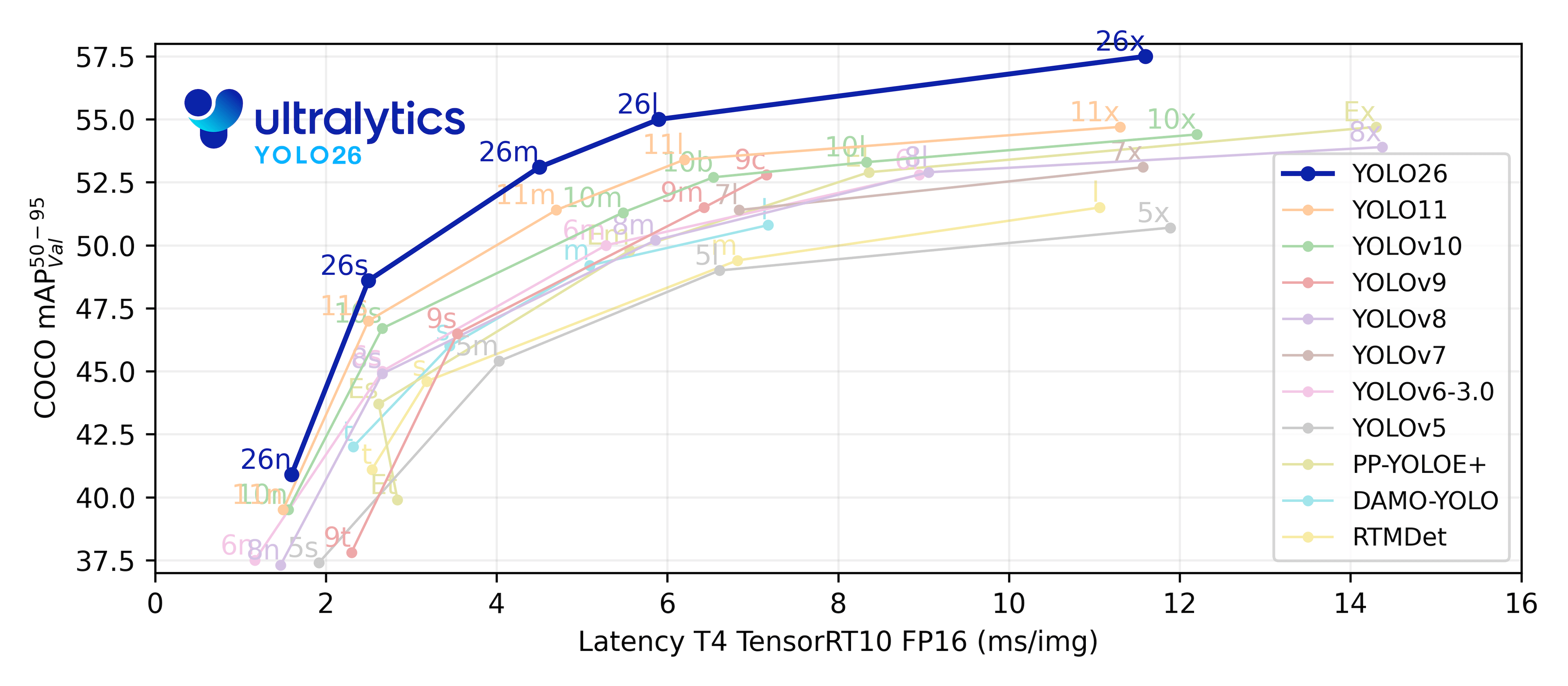
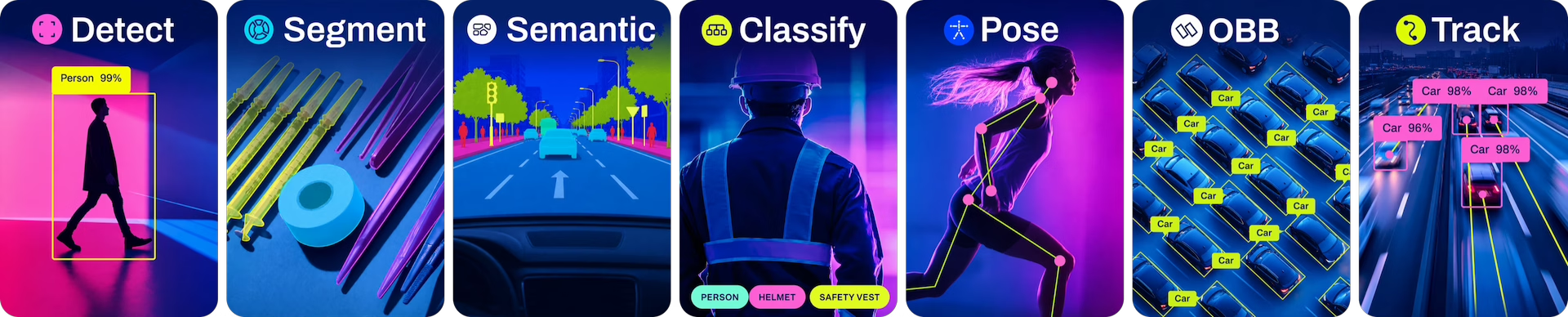
Ultralytics supports a wide range of YOLO models, from early versions like YOLOv3 to the latest YOLO26. The tables below showcase YOLO26 models pretrained on COCO for Detection, Segmentation, and Pose Estimation. Semantic Segmentation models are pretrained on Cityscapes, and Classification models are pretrained on ImageNet. Tracking mode is compatible with Detection, Segmentation, and Pose models. All Models download automatically from the latest Ultralytics release on first use.
Detection (COCO)
Explore the Detection Docs for usage examples. These models are trained on the COCO dataset, featuring 80 object classes.
| Model | size (pixels) |
mAPval 50-95 |
mAPval 50-95(e2e) |
Speed CPU ONNX (ms) |
Speed T4 TensorRT10 (ms) |
params (M) |
FLOPs (B) |
|---|---|---|---|---|---|---|---|
| YOLO26n | 640 | 40.9 | 40.1 | 38.9 ± 0.7 | 1.7 ± 0.0 | 2.4 | 5.4 |
| YOLO26s | 640 | 48.6 | 47.8 | 87.2 ± 0.9 | 2.5 ± 0.0 | 9.5 | 20.7 |
| YOLO26m | 640 | 53.1 | 52.5 | 220.0 ± 1.4 | 4.7 ± 0.1 | 20.4 | 68.2 |
| YOLO26l | 640 | 55.0 | 54.4 | 286.2 ± 2.0 | 6.2 ± 0.2 | 24.8 | 86.4 |
| YOLO26x | 640 | 57.5 | 56.9 | 525.8 ± 4.0 | 11.8 ± 0.2 | 55.7 | 193.9 |
- mAPval values refer to single-model single-scale performance on the COCO val2017 dataset. See YOLO Performance Metrics for details.
Reproduce withyolo val detect data=coco.yaml device=0 - Speed metrics are averaged over COCO val images using an Amazon EC2 P4d instance. CPU speeds measured with ONNX export. GPU speeds measured with TensorRT export.
Reproduce withyolo val detect data=coco.yaml batch=1 device=0|cpu
Segmentation (COCO)
Refer to the Segmentation Docs for usage examples. These models are trained on COCO-Seg, including 80 classes.
| Model | size (pixels) |
mAPbox 50-95(e2e) |
mAPmask 50-95(e2e) |
Speed CPU ONNX (ms) |
Speed T4 TensorRT10 (ms) |
params (M) |
FLOPs (B) |
|---|---|---|---|---|---|---|---|
| YOLO26n-seg | 640 | 39.6 | 33.9 | 53.3 ± 0.5 | 2.1 ± 0.0 | 2.7 | 9.1 |
| YOLO26s-seg | 640 | 47.3 | 40.0 | 118.4 ± 0.9 | 3.3 ± 0.0 | 10.4 | 34.2 |
| YOLO26m-seg | 640 | 52.5 | 44.1 | 328.2 ± 2.4 | 6.7 ± 0.1 | 23.6 | 121.5 |
| YOLO26l-seg | 640 | 54.4 | 45.5 | 387.0 ± 3.7 | 8.0 ± 0.1 | 28.0 | 139.8 |
| YOLO26x-seg | 640 | 56.5 | 47.0 | 787.0 ± 6.8 | 16.4 ± 0.1 | 62.8 | 313.5 |
- mAPval values are for single-model single-scale on the COCO val2017 dataset. See YOLO Performance Metrics for details.
Reproduce withyolo val segment data=coco.yaml device=0 - Speed metrics are averaged over COCO val images using an Amazon EC2 P4d instance. CPU speeds measured with ONNX export. GPU speeds measured with TensorRT export.
Reproduce withyolo val segment data=coco.yaml batch=1 device=0|cpu
Semantic Segmentation (Cityscapes)
See the Semantic Segmentation Docs for usage examples. These models are trained on Cityscapes, including 19 classes.
| Model | size (pixels) |
mIoUval | Speed RTX3090 PyTorch (ms) |
params (M) |
FLOPs (B) |
|---|---|---|---|---|---|
| YOLO26n-sem | 1024 × 2048 | 78.3 | 4.4 ± 0.0 | 1.6 | 22.7 |
| YOLO26s-sem | 1024 × 2048 | 80.8 | 8.4 ± 0.0 | 6.5 | 88.8 |
| YOLO26m-sem | 1024 × 2048 | 82.0 | 19.9 ± 0.1 | 14.3 | 304.5 |
| YOLO26l-sem | 1024 × 2048 | 82.9 | 26.5 ± 0.1 | 17.9 | 384.7 |
| YOLO26x-sem | 1024 × 2048 | 83.6 | 48.9 ± 0.2 | 40.2 | 861.7 |
- mIoUval values are for single-model single-scale on the Cityscapes validation set.
Reproduce withyolo semantic val data=cityscapes.yaml device=0 imgsz=2048 - Speed metrics are averaged over Cityscapes validation images using an RTX3090 instance.
Reproduce withyolo semantic val data=cityscapes.yaml batch=1 device=0|cpu imgsz=2048
Classification (ImageNet)
Consult the Classification Docs for usage examples. These models are trained on ImageNet, covering 1000 classes.
| Model | size (pixels) |
acc top1 |
acc top5 |
Speed CPU ONNX (ms) |
Speed T4 TensorRT10 (ms) |
params (M) |
FLOPs (B) at 224 |
|---|---|---|---|---|---|---|---|
| YOLO26n-cls | 224 | 71.4 | 90.1 | 5.0 ± 0.3 | 1.1 ± 0.0 | 2.8 | 0.5 |
| YOLO26s-cls | 224 | 76.0 | 92.9 | 7.9 ± 0.2 | 1.3 ± 0.0 | 6.7 | 1.6 |
| YOLO26m-cls | 224 | 78.1 | 94.2 | 17.2 ± 0.4 | 2.0 ± 0.0 | 11.6 | 4.9 |
| YOLO26l-cls | 224 | 79.0 | 94.6 | 23.2 ± 0.3 | 2.8 ± 0.0 | 14.1 | 6.2 |
| YOLO26x-cls | 224 | 79.9 | 95.0 | 41.4 ± 0.9 | 3.8 ± 0.0 | 29.6 | 13.6 |
- acc values represent model accuracy on the ImageNet dataset validation set.
Reproduce withyolo val classify data=path/to/ImageNet device=0 - Speed metrics are averaged over ImageNet val images using an Amazon EC2 P4d instance. CPU speeds measured with ONNX export. GPU speeds measured with TensorRT export.
Reproduce withyolo val classify data=path/to/ImageNet batch=1 device=0|cpu
Pose (COCO)
See the Pose Estimation Docs for usage examples. These models are trained on COCO-Pose, focusing on the 'person' class.
| Model | size (pixels) |
mAPpose 50-95(e2e) |
mAPpose 50(e2e) |
Speed CPU ONNX (ms) |
Speed T4 TensorRT10 (ms) |
params (M) |
FLOPs (B) |
|---|---|---|---|---|---|---|---|
| YOLO26n-pose | 640 | 57.2 | 83.3 | 40.3 ± 0.5 | 1.8 ± 0.0 | 2.9 | 7.5 |
| YOLO26s-pose | 640 | 63.0 | 86.6 | 85.3 ± 0.9 | 2.7 ± 0.0 | 10.4 | 23.9 |
| YOLO26m-pose | 640 | 68.8 | 89.6 | 218.0 ± 1.5 | 5.0 ± 0.1 | 21.5 | 73.1 |
| YOLO26l-pose | 640 | 70.4 | 90.5 | 275.4 ± 2.4 | 6.5 ± 0.1 | 25.9 | 91.3 |
| YOLO26x-pose | 640 | 71.6 | 91.6 | 565.4 ± 3.0 | 12.2 ± 0.2 | 57.6 | 201.7 |
- mAPval values are for single-model single-scale on the COCO Keypoints val2017 dataset. See YOLO Performance Metrics for details.
Reproduce withyolo val pose data=coco-pose.yaml device=0 - Speed metrics are averaged over COCO val images using an Amazon EC2 P4d instance. CPU speeds measured with ONNX export. GPU speeds measured with TensorRT export.
Reproduce withyolo val pose data=coco-pose.yaml batch=1 device=0|cpu
Oriented Bounding Boxes (DOTAv1)
Check the OBB Docs for usage examples. These models are trained on DOTAv1, including 15 classes.
| Model | size (pixels) |
mAPtest 50-95(e2e) |
mAPtest 50(e2e) |
Speed CPU ONNX (ms) |
Speed T4 TensorRT10 (ms) |
params (M) |
FLOPs (B) |
|---|---|---|---|---|---|---|---|
| YOLO26n-obb | 1024 | 52.4 | 78.9 | 97.7 ± 0.9 | 2.8 ± 0.0 | 2.5 | 14.0 |
| YOLO26s-obb | 1024 | 54.8 | 80.9 | 218.0 ± 1.4 | 4.9 ± 0.1 | 9.8 | 55.1 |
| YOLO26m-obb | 1024 | 55.3 | 81.0 | 579.2 ± 3.8 | 10.2 ± 0.3 | 21.2 | 183.3 |
| YOLO26l-obb | 1024 | 56.2 | 81.6 | 735.6 ± 3.1 | 13.0 ± 0.2 | 25.6 | 230.0 |
| YOLO26x-obb | 1024 | 56.7 | 81.7 | 1485.7 ± 11.5 | 30.5 ± 0.9 | 57.6 | 516.5 |
- mAPtest values are for single-model multiscale performance on the DOTAv1 test set.
Reproduce byyolo val obb data=DOTAv1.yaml device=0 split=testand submit merged results to the DOTA evaluation server. - Speed metrics are averaged over DOTAv1 val images using an Amazon EC2 P4d instance. CPU speeds measured with ONNX export. GPU speeds measured with TensorRT export.
Reproduce byyolo val obb data=DOTAv1.yaml batch=1 device=0|cpu
🧩 Integrations
Our key integrations with leading AI platforms extend the functionality of Ultralytics' offerings, enhancing tasks like dataset labeling, training, visualization, and model management. Discover how Ultralytics, in collaboration with partners like Weights & Biases, Comet ML, Roboflow, and Intel OpenVINO, can optimize your AI workflow. Explore more at Ultralytics Integrations.

🤝 Contribute
We thrive on community collaboration! Ultralytics YOLO wouldn't be the SOTA framework it is without contributions from developers like you. Please see our Contributing Guide to get started. We also welcome your feedback—share your experience by completing our Survey. A huge Thank You 🙏 to everyone who contributes!
We look forward to your contributions to help make the Ultralytics ecosystem even better!
📜 License
Ultralytics offers two licensing options to suit different needs:
- AGPL-3.0 License: This OSI-approved open-source license is perfect for students, researchers, and enthusiasts. It encourages open collaboration and knowledge sharing. See the LICENSE file for full details.
- Ultralytics Enterprise License: For development and production use, this license enables seamless integration of Ultralytics software and AI models into business products and services, including internal tools, automated workflows, and production deployments, bypassing the open-source requirements of AGPL-3.0. To get started, please contact us via Ultralytics Licensing.
📞 Contact
For bug reports and feature requests related to Ultralytics software, please visit GitHub Issues. For questions, discussions, and community support, join our active communities on Discord, Reddit, and the Ultralytics Community Forums. We're here to help with all things Ultralytics!