
1.7 KiB
1.7 KiB
| comments | description | keywords |
|---|---|---|
| true | Connect Ultralytics Platform to the tools you already use and bring your data across with a single API key. Import from Ultralytics HUB and Roboflow — no manual export or re-upload. | Ultralytics Platform, integrations, data import, Roboflow, Ultralytics HUB, dataset migration, YOLO, computer vision |
Integrations
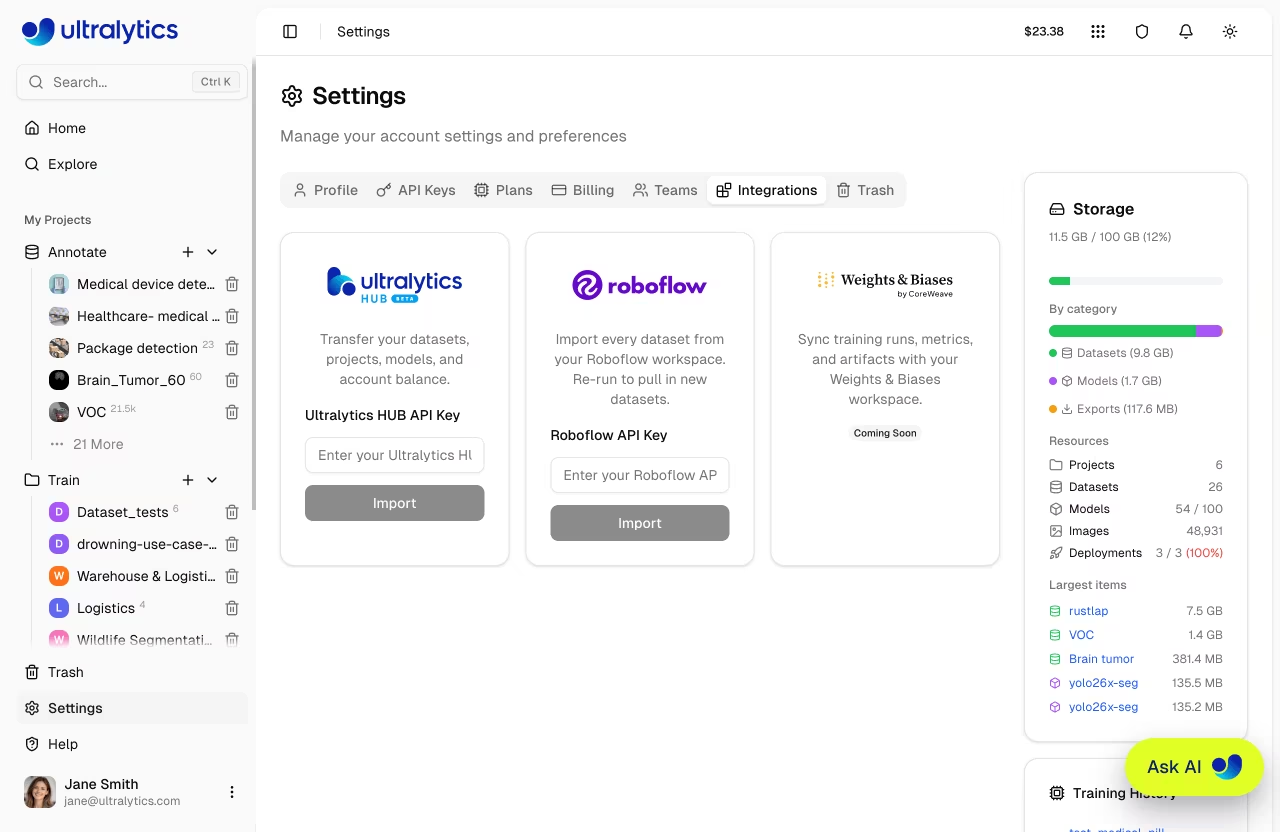
Ultralytics Platform integrations connect your workspace to other tools and services you already use. Today, integrations let you bring your data without manually exporting archives and re-uploading them — connect an account with an API key.
Accessing Integrations
All integrations are managed from your account settings:
- Go to Settings > Integrations
- Find the card for the service you want to connect
- Paste your API key and click Import
Each import starts with a preview so you can review exactly what will be transferred — and confirm you have enough storage — before anything is imported.
Available Integrations
| Integration | What it brings in |
|---|---|
| Ultralytics HUB | Your datasets, projects, models, and account balance |
| Roboflow | Your datasets |
Connect once with an API key and the matching content lands in your workspace.